Screenshot Monitoring Software Workflow Guide| EmpTrakr
Learn how a screenshot monitoring software workflow supports remote teams with capture, review, and accountability. Practical steps and fair comparisons for managers.
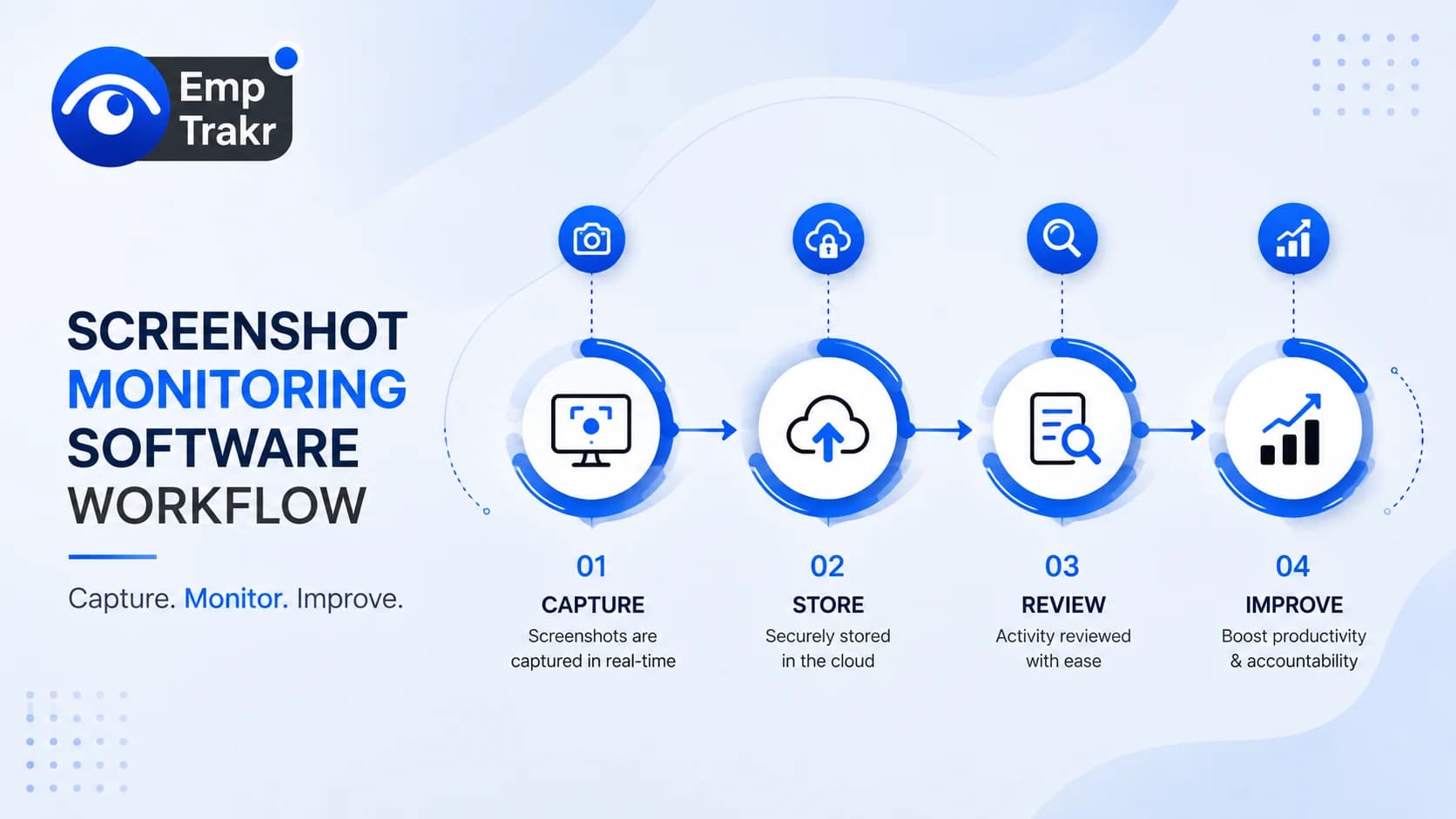
A screenshot monitoring software workflow captures periodic screen images tied to time and activity logs so managers can review work evidence. Independent 2026 roundups compare tools like Hubstaff and SoftActivity for audits and accountability. Always set clear policies; this is informational only and not legal advice.
Screenshot monitoring software workflow: definition and decision context?
A screenshot monitoring software workflow is the process of capturing periodic screen images linked to time tracking and activity data so managers can review evidence for accountability and audits. Independent rankings of top screenshot monitoring software in 2026 evaluate tools including Hubstaff, SoftActivity, and Kickidler on features that support this flow.2026 screenshot monitoring rankings
Teams use the workflow when they need traceable records across distributed devices. Capture settings, review dashboards, and export options form the core loop. Decision context includes matching capture frequency to project billing or policy enforcement needs. For related options see Employee monitoring software.
Source limits apply: the cited roundup focuses on feature comparisons and does not cover every legal jurisdiction. Managers should confirm local rules before adoption and keep the workflow limited to work-related endpoints.
Who should consider screenshot monitoring software workflow?
Technical buyers and managers of remote or hybrid teams should consider a screenshot monitoring software workflow when they need to verify workplace actions and security posture through periodic screenshots plus endpoint events.Screen capture monitoring definition
It fits operators comparing capture frequency, logging depth, and audit quality. Compliance-minded groups that want correlated evidence for investigations also benefit. Small-business founders evaluating Time tracking software Often start here to add visual context to hours logged.
Not every team needs continuous capture. Light-touch groups may prefer activity summaries alone. Always weigh privacy impact and notify employees clearly. Evidence in the buyer guide stays at the product-feature level and does not certify suitability for every industry.
Benefits and practical limitations
Benefits center on reviewable timelines that let teams verify browsing, app usage, and work windows, while limitations include the need for careful configuration and privacy safeguards. One 2026 ranking notes CurrentWare BrowseReporter as a strong option for screenshot-based monitoring focused on browsing and app usage with reviewable timelines, and Teramind for compliance-led teams seeking screen evidence tied to behavior analytics.2026 screen capture rankings
Practical gains include faster incident review and clearer coaching conversations. SoftActivity and Monitask appear in the same roundup for mid-size teams needing daily workflow context. Limitations remain real: capture volume can overwhelm reviewers without filters, and storage or redaction settings must be tuned.
- Ties visual evidence to time and activity logs for accountability
- Supports audit and dispute resolution with timestamped captures
- Allows focused review of browsing and application usage
- Requires clear employee notice and policy to stay fair
- High capture volume can create review fatigue without filters
- Privacy and data-retention rules vary by location and need legal review
Pair the workflow with Productivity tracking So screenshots stay secondary to outcomes. Do not extrapolate ranking scores beyond the cited comparison.
Employee monitoring software free and the reader decision
When weighing free or freemium employee monitoring options against paid screenshot workflows, readers should compare capture depth, timeline quality, and investigation features rather than price alone. Related buyer guides highlight Teramind among tools that move beyond passive recording into policy-triggered investigation flows.Teramind investigation workflows
Free tiers often limit screenshot frequency, retention, or AI review. Paid plans typically add searchable evidence views and role-based access. Decision factors include team size, remote versus hybrid mix, and whether visual records are needed for payroll disputes or coaching.
Explore dedicated Screenshot monitoring Pages to map features against your policy. Source material lists related reading on automated capture and computer screen monitoring but does not publish free-plan pricing; verify current offers directly with vendors.
Free employee monitoring software and the reader decision
Free employee monitoring software can seed a basic workflow, yet full screenshot monitoring usually needs paid features for reliable timeline replay and evidence export. A 2026 review highlights Hubstaff’s timeline replay that ties screenshot captures to time logs so managers can review evidence by tracked work window.Hubstaff timeline replay
SoftActivity and Kickidler also appear among editor picks for blur redaction, PII masking, and time-bounded desktop history. Readers deciding between free starters and paid upgrades should test whether the free layer supports audit-ready exports and manager permissions.
Use an Installation guide And review Security & privacy Settings before rollout. The cited methodology scores products on features, ease of use, and value after documentation checks and review aggregation; it does not guarantee outcomes for every free plan.
Conclusion
A clear screenshot monitoring software workflow helps remote and hybrid teams add visual context to time and activity data when policies and notice are already in place. Independent 2026 comparisons surface tools with timeline replay, redaction, and investigation routing that support audits and coaching without turning monitoring into surveillance theater.
Limitations stay important: capture settings must match real needs, storage and access controls need ongoing attention, and legal framing differs by jurisdiction. Next steps are to define the exact decision criteria, pilot with a small group, and document consent and retention rules. For attendance needs see Attendance tracking And check current Pricing Options.
Sources
- Top 10 Best Screenshot Monitoring Software (2026 Review) — worldmetrics.org
- Best Screen Capture Monitoring Software – 2026 Buyer's Guide — gitnux.org, 2026-03-12T00:00:00.000Z
- Best Screen Capture Monitoring Software | 2026 Rankings — zipdo.co, 2026-03-12T00:00:00.000Z
Frequently Asked Questions
What is screenshot monitoring software workflow?
Is screenshot monitoring software workflow suitable for the target audience?
How should readers evaluate screenshot monitoring software workflow safely?
Related EmpTrakr resources
Continue with product pages that match this topic — and explore more guides on the blog.
Supercharge your workforce today.
Join leading companies using EmpTrakr to boost productivity, streamline tracking, and optimize remote teams.