
Google Drive storage
Use Google Drive as the screenshot archive for company work sessions.
Visual timelines for responsible review.
EmpTrakr helps companies capture automated screenshots alongside time, app usage and activity signals so managers can review work with better context.
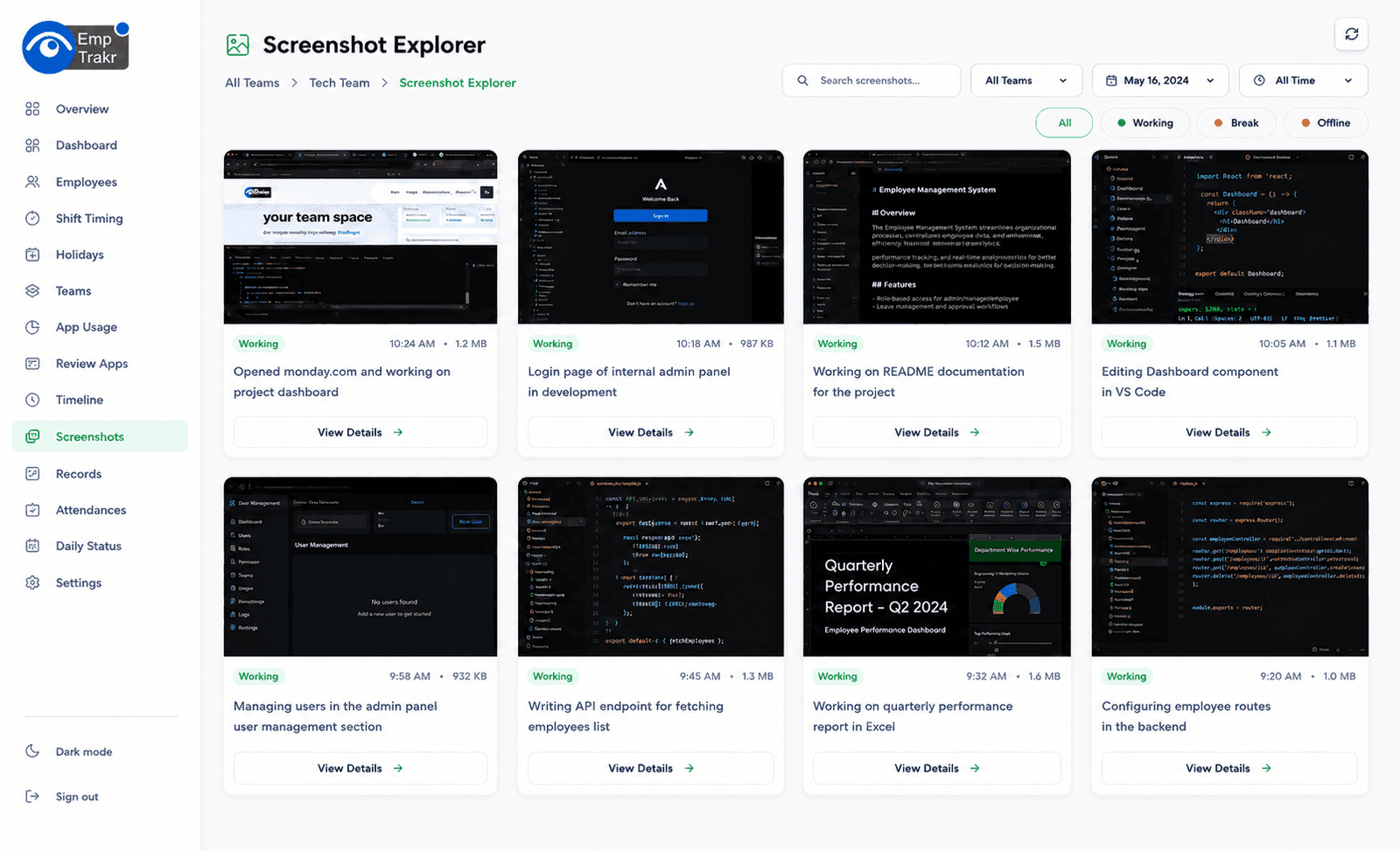
screenshots
storage ready
review
Admins can connect Google Drive or OneDrive so employee screenshots are uploaded to company-owned storage instead of staying scattered across devices.
EmpTrakr organizes screenshots into separate folders for each employee, making reviews, audits and monthly records easier to manage.
Use Google Drive as the screenshot archive for company work sessions.

Use Microsoft OneDrive when your company stores work files in Microsoft 365.
Screenshot monitoring software (also called employee screenshot monitoring or automatic screenshot capture) automatically takes screenshots of employee screens during tracked work sessions. It provides visual proof of work, timelines of activity, and productivity insights—helping managers verify work progress, reduce disputes, and manage remote and hybrid teams.
It differs from live app tracking by adding visual evidence alongside text-based app and window data. It works for office, hybrid, and remote teams.
Screenshots show exactly what happened on screen.
Activity history with timestamps and context.
Seamless across all environments.
Visual proof of work, verify work progress, support remote team management, reduce disputes over work hours, improve accountability, and review workflows for process improvement.
Showing cards 1 to 3 of 6
Screenshots confirm what employees actually did.
Track milestones and deliverables visually.
Manage distributed work with clear visual evidence.
Showing benefits 1 to 3 of 4
Capture screenshots at configured intervals while employees are clocked in.
Review screenshots with time and activity context instead of isolated image folders.
Connect Google Drive or OneDrive so screenshots are stored in your own company account.
Admins choose screenshot settings and connect company storage where supported.
Screenshots are captured only as part of tracked work sessions from the desktop app.
Managers inspect screenshots beside attendance, time and app activity signals.
| Feature | Description | EmpTrakr |
|---|---|---|
| Automatic Screenshots | Yes | |
| Scheduled Capture | Yes | |
| Interval-Based Capture | Yes | |
| Screenshot History | Yes | |
| Activity Timeline | Yes | |
| Secure Storage | Yes | |
| Screenshot Reports | Yes | |
| Dashboard View | Yes |
Captures screenshots only during tracked work sessions.
Set frequency (e.g., every 5 minutes) or on-demand.
View past screenshots with timestamps.
Activity timeline with screenshots and app data.
Upload to company Google Drive or OneDrive.
Screenshots combined with time and app data.
Managers review team screenshots in one place.
Excel, CSV, and PDF exports.
Alerts for new screenshots or issues.
Admins see everything; others see team views.
Captures screenshots only during tracked work sessions.
Set frequency (e.g., every 5 minutes) or on-demand.
View past screenshots with timestamps.
Activity timeline with screenshots and app data.
Upload to company Google Drive or OneDrive.
Screenshots combined with time and app data.
Managers review team screenshots in one place.
Excel, CSV, and PDF exports.
Alerts for new screenshots or issues.
Admins see everything; others see team views.
Captures screenshots only during tracked work sessions.
Set frequency (e.g., every 5 minutes) or on-demand.
View past screenshots with timestamps.
Activity timeline with screenshots and app data.
Upload to company Google Drive or OneDrive.
Screenshots combined with time and app data.
Managers review team screenshots in one place.
Excel, CSV, and PDF exports.
Alerts for new screenshots or issues.
Admins see everything; others see team views.
Fully distributed workforces with visual verification.
Software development and support teams.
Creative and marketing agencies.
Customer support and operations.
Call centers and helpdesk teams.
Fully distributed workforces with visual verification.
Software development and support teams.
Creative and marketing agencies.
Customer support and operations.
Call centers and helpdesk teams.
Fully distributed workforces with visual verification.
Software development and support teams.
Creative and marketing agencies.
Customer support and operations.
Call centers and helpdesk teams.
Contractor and gig economy monitoring.
Code review and progress tracking.
Accounting and analysis teams.
Client-facing project work.
Campaign and content creation.
Contractor and gig economy monitoring.
Code review and progress tracking.
Accounting and analysis teams.
Client-facing project work.
Campaign and content creation.
Contractor and gig economy monitoring.
Code review and progress tracking.
Accounting and analysis teams.
Client-facing project work.
Campaign and content creation.
Screenshot monitoring adds visual proof; live app tracking adds real-time text and app data.
| Feature | Screenshot Monitoring | Live App Tracking |
|---|---|---|
| Visual Proof | ✓ | ✗ |
| Running Applications | ✗ | ✓ |
| Screenshot History | ✓ | ✗ |
| App Analytics | ✗ | ✓ |
Screenshot monitoring provides visual evidence and timelines; employee monitoring adds attendance and basic time tracking.
| Feature | Screenshot Monitoring | Employee Monitoring |
|---|---|---|
| Visual Evidence | ✓ | Limited |
| Productivity Analytics | Basic | ✓ |
| Attendance | ✗ | ✓ |
| Time Tracking | ✗ | ✓ |
All screenshots encrypted in transit and at rest.
Upload to company Google Drive or OneDrive.
Granular permissions.
Full history of access and changes.
Configurable storage duration.
Regular automated backups.
Employees are informed that screenshots are taken during work hours.
Clear company policies.
Admins set intervals and scope.
Employees see only their own screenshots.
Tracking limited to paid work time.
Screenshots used for coaching and verification, never personal spying.
Inform employees about screenshot monitoring
Capture only during work hours
Configure appropriate intervals
Limit screenshot access to authorized managers
Protect stored screenshots
Use screenshots for coaching and verification, not constant surveillance
Review policies and categories regularly
Captures screenshots only during tracked work sessions.
Upload to your own Google Drive or OneDrive.
Screenshots combined with time, app, and attendance data.
Timeline view and gallery for team review.
Department and team-level visual reports.
Full dashboard accessible from any device.
Excel, CSV, and PDF exports.
Combine screenshots with time, attendance, and app tracking.