Real-time visibility
See which apps are open and active right now.
See apps, websites and active time in real time.
EmpTrakr shows the apps and websites employees use during tracked sessions, with live status and review-ready context for managers.
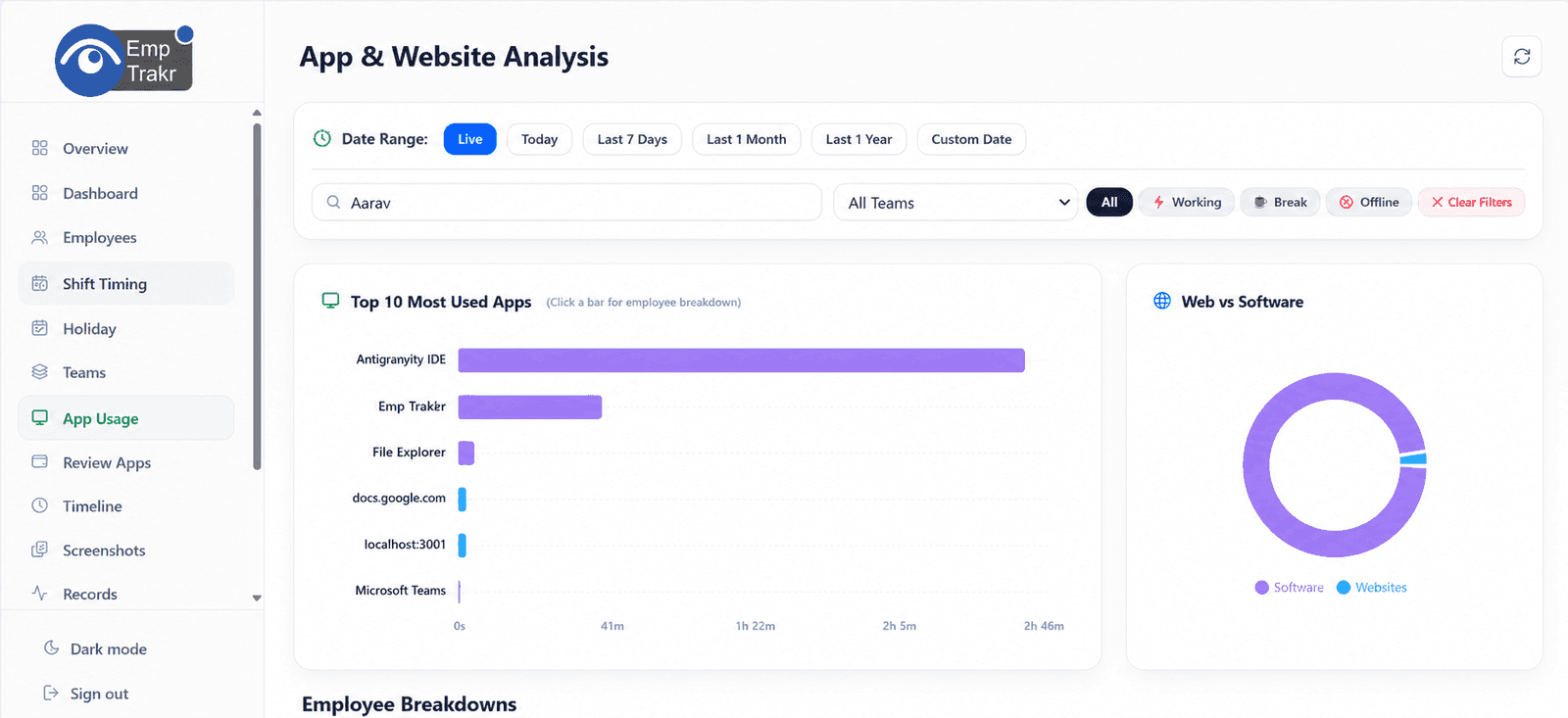
app status
usage context
app categories
Live app tracking software (also called application tracking software or app usage tracking) shows employees' desktop and browser applications in real time during tracked work sessions. It classifies apps, tracks active usage, and provides dashboards with live status, timelines, and analytics—helping managers understand exactly what tools their teams are using.
It differs from basic employee monitoring by adding real-time visibility, app classification (productive vs distracting), and actionable reports. It works for office, remote, and hybrid teams.
See which apps are open and active right now.
Classify and monitor tools used during work.
Seamless across all work environments.
Know which applications employees use, improve software adoption, reduce time spent on distracting apps, optimize software licensing, understand work patterns, and improve operational efficiency.
Showing cards 1 to 3 of 6
Get a clear picture of the tools being used during work.
Spot under-used or under-adopted tools.
Identify and address non-work or low-value applications.
Showing benefits 1 to 3 of 4
Know which work tools are open during tracked sessions without waiting for manual updates.
Review browser activity beside desktop app usage so managers can understand the full work context.
Mark apps and websites as productive, neutral or unproductive based on your company workflow.
The desktop tracker begins recording app and website activity only during tracked work sessions.
EmpTrakr organizes active windows, browser usage, duration and idle context into live admin views.
Admins classify tools, spot distracting patterns and coach teams with clearer activity evidence.
| Feature | Description | EmpTrakr |
|---|---|---|
| Running Applications | Yes | |
| Active Applications | Yes | |
| Time Spent per App | Yes | |
| Productive Apps | Yes | |
| Non-Productive Apps | Yes | |
| Application Categories | Yes | |
| Usage Reports | Yes | |
| Live Dashboard | Yes |
Real-time tracking of desktop and browser apps during work sessions.
Live view of which apps are open and active.
Detect and monitor currently running applications.
Classify apps for productivity scoring.
Custom categories (CRM, gaming, office suite, etc.).
Daily, weekly, monthly, and department reports.
Team and department-level insights.
Flags for overtime, low productivity, or specific app flags.
Excel, CSV, and PDF exports.
Granular permissions for managers and admins.
Real-time tracking of desktop and browser apps during work sessions.
Live view of which apps are open and active.
Detect and monitor currently running applications.
Classify apps for productivity scoring.
Custom categories (CRM, gaming, office suite, etc.).
Daily, weekly, monthly, and department reports.
Team and department-level insights.
Flags for overtime, low productivity, or specific app flags.
Excel, CSV, and PDF exports.
Granular permissions for managers and admins.
Real-time tracking of desktop and browser apps during work sessions.
Live view of which apps are open and active.
Detect and monitor currently running applications.
Classify apps for productivity scoring.
Custom categories (CRM, gaming, office suite, etc.).
Daily, weekly, monthly, and department reports.
Team and department-level insights.
Flags for overtime, low productivity, or specific app flags.
Excel, CSV, and PDF exports.
Granular permissions for managers and admins.
Software development, QA, and support teams.
IDE and coding tool usage tracking.
CRM, ticketing, and call tracking.
Support and operations shift productivity.
Banking, trading, and analytical tools.
Software development, QA, and support teams.
IDE and coding tool usage tracking.
CRM, ticketing, and call tracking.
Support and operations shift productivity.
Banking, trading, and analytical tools.
Software development, QA, and support teams.
IDE and coding tool usage tracking.
CRM, ticketing, and call tracking.
Support and operations shift productivity.
Banking, trading, and analytical tools.
Medical systems and admin apps.
Creative and design software usage.
Project management and client tools.
Learning platforms and admin tools.
Fully distributed application monitoring.
Medical systems and admin apps.
Creative and design software usage.
Project management and client tools.
Learning platforms and admin tools.
Fully distributed application monitoring.
Medical systems and admin apps.
Creative and design software usage.
Project management and client tools.
Learning platforms and admin tools.
Fully distributed application monitoring.
Live app tracking covers desktop applications; website tracking focuses on browser activity.
| Feature | Live App Tracking | Website Tracking |
|---|---|---|
| Desktop Applications | ✓ | ✗ |
| Browser Websites | ✗ | ✓ |
| Software Analytics | ✓ | Limited |
| App Categories | ✓ | ✗ |
Live app tracking provides real-time text and category data; screenshot monitoring adds visual proof.
| Feature | Live App Tracking | Screenshot Monitoring |
|---|---|---|
| Real-Time App Visibility | ✓ | ✗ |
| Visual Proof | ✗ | ✓ |
| Application Analytics | ✓ | ✗ |
| Screenshot Capture | ✗ | ✓ |
All app usage data encrypted in transit and at rest.
Enterprise-grade cloud security.
Granular access controls.
Full history of access and changes.
SSO and 2FA supported.
Regular automated backups.
Employees are informed that application usage is tracked during work hours.
Clear company policies on tracking.
Admins control what is classified and reported.
Role-based visibility and data retention options.
Employees see only their own data.
Focus on improvement and productivity, not surveillance.
Define approved application categories
Review application reports regularly
Monitor trends instead of isolated events
Respect employee privacy
Update application classifications as needed
Use reports for workflow optimization
Share productivity insights responsibly
Real-time visibility into running desktop and browser apps.
Productive vs non-productive classification and reports.
Live activity feed, timelines, and status.
Exportable daily, weekly, and team summaries.
Department and team-level comparisons.
Full visibility from any device.
Excel, CSV, and PDF exports.
Unified insights combining app tracking with time and attendance.