Office employees
Full shift and break tracking with live status.
Real-time attendance without manual registers.
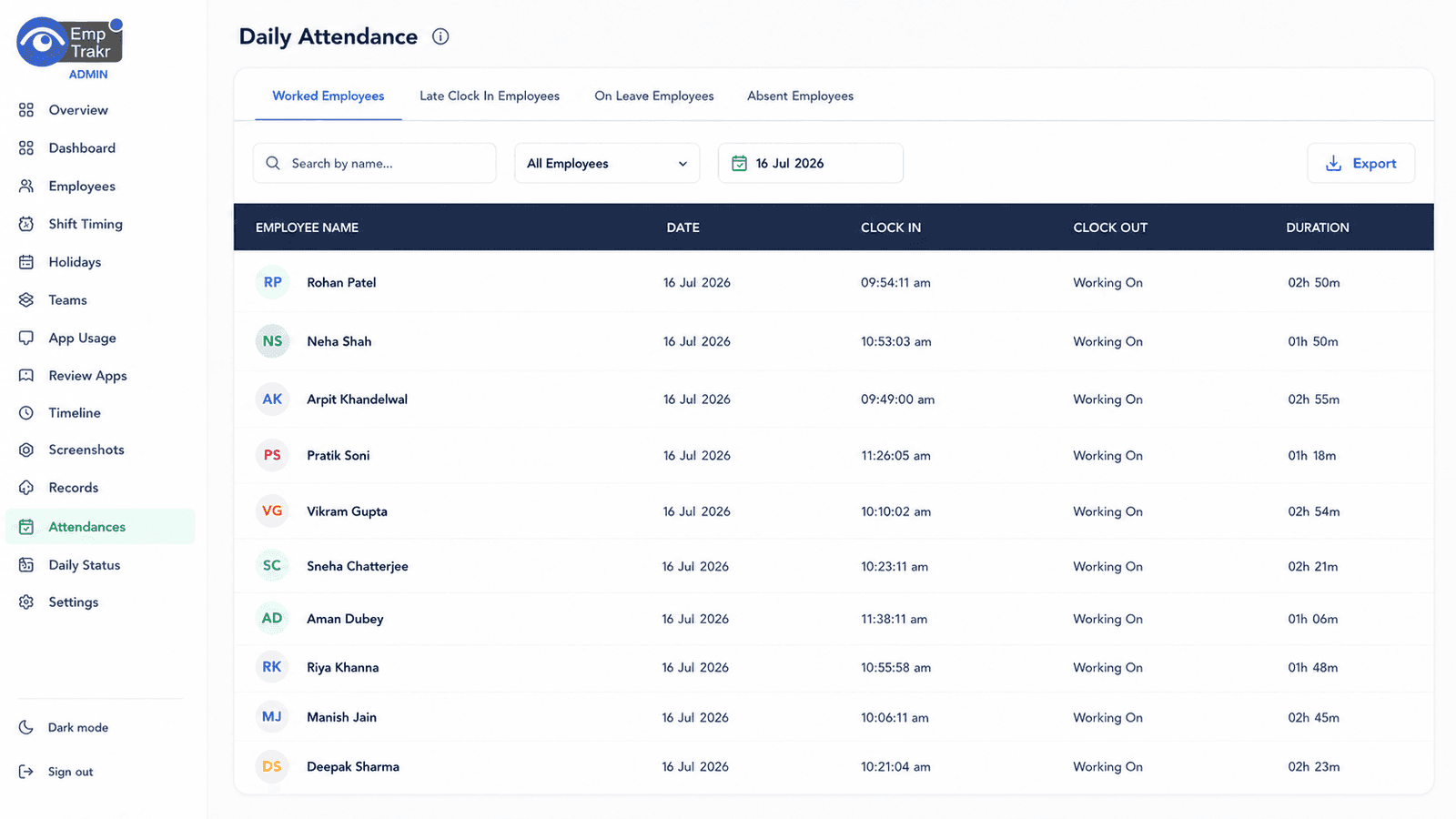
EmpTrakr helps teams manage attendance with web and desktop clock-ins, live status, shift history and exportable reports.
in and out
attendance
reports
Attendance tracking software (also called employee attendance tracking or attendance management software) automatically records clock-ins, clock-outs, breaks, late arrivals, early departures, and shift status. It replaces manual registers with real-time tracking and gives admins accurate attendance reports for payroll, compliance, and workforce planning.
Automated attendance works for office, remote, and hybrid teams. It supports multiple shifts, holidays, and leave tracking while ensuring accurate payroll and reducing time theft.
Full shift and break tracking with live status.
Clock-in/out and shift records from any device.
Combined office and remote attendance visibility.
Eliminate manual registers, reduce attendance errors, improve payroll accuracy, monitor remote employees, support shift management, and ensure compliance.
Showing cards 1 to 3 of 7
No more physical books or spreadsheets—everything is automated.
Accurate clock-in/out and auto-flagging of late arrivals or early departures.
Payroll-ready attendance records reduce costly manual corrections.
Showing benefits 1 to 3 of 4
See who is active, on break, offline or late from the admin dashboard.
Support practical clock-in workflows for employees across different work setups.
Review daily work sessions, breaks and totals without asking for manual summaries.
Admins add employees, teams, timezones and work rules inside the company workspace.
Employees clock in through the supported workflow and EmpTrakr records attendance status.
Managers use live dashboards and reports to review late starts, absences and work totals.
| Feature | Description | EmpTrakr |
|---|---|---|
| Daily Attendance | Yes | |
| Check-in | Yes | |
| Check-out | Yes | |
| Break Time | Yes | |
| Late Arrival | Yes | |
| Early Leaving | Yes | |
| Overtime | Yes | |
| Leave Status | Yes | |
| Shift Attendance | Yes | |
| Reports | Yes |
Automatic check-in, check-out, and session recording.
Web and desktop clock-in/out with live status.
Multiple shifts, weekly off, holidays, and flexible hours.
Automatic leave status and approvals.
Auto-flagging and reporting of extra hours.
Instant alerts and reports for late starts.
Monthly view of all shifts and attendance.
Daily, weekly, monthly, department, and employee summaries.
Alerts for overtime, late arrivals, and leave status.
Admins, managers, and employees with controlled access.
Automatic check-in, check-out, and session recording.
Web and desktop clock-in/out with live status.
Multiple shifts, weekly off, holidays, and flexible hours.
Automatic leave status and approvals.
Auto-flagging and reporting of extra hours.
Instant alerts and reports for late starts.
Monthly view of all shifts and attendance.
Daily, weekly, monthly, department, and employee summaries.
Alerts for overtime, late arrivals, and leave status.
Admins, managers, and employees with controlled access.
Automatic check-in, check-out, and session recording.
Web and desktop clock-in/out with live status.
Multiple shifts, weekly off, holidays, and flexible hours.
Automatic leave status and approvals.
Auto-flagging and reporting of extra hours.
Instant alerts and reports for late starts.
Monthly view of all shifts and attendance.
Daily, weekly, monthly, department, and employee summaries.
Alerts for overtime, late arrivals, and leave status.
Admins, managers, and employees with controlled access.
Shift-based IT support and development teams.
Production shifts and shift handovers.
On-call, shift nursing, and medical staff.
Store opening/closing and shift schedules.
Site-based and project shifts.
Shift-based IT support and development teams.
Production shifts and shift handovers.
On-call, shift nursing, and medical staff.
Store opening/closing and shift schedules.
Site-based and project shifts.
Shift-based IT support and development teams.
Production shifts and shift handovers.
On-call, shift nursing, and medical staff.
Store opening/closing and shift schedules.
Site-based and project shifts.
Classroom and administrative staff attendance.
High-volume shift tracking and performance monitoring.
Route and warehouse shift management.
Hotel and restaurant shift rosters.
General workforce attendance and compliance.
Classroom and administrative staff attendance.
High-volume shift tracking and performance monitoring.
Route and warehouse shift management.
Hotel and restaurant shift rosters.
General workforce attendance and compliance.
Classroom and administrative staff attendance.
High-volume shift tracking and performance monitoring.
Route and warehouse shift management.
Hotel and restaurant shift rosters.
General workforce attendance and compliance.
Attendance tracking focuses on presence and status; time tracking adds detailed hours, projects, and billable work.
| Feature | Attendance Tracking | Time Tracking |
|---|---|---|
| Check-in/Out | ✓ | Limited |
| Work Hours | Basic | Detailed |
| Overtime | ✓ | ✓ |
| Project Hours | ✗ | ✓ |
| Payroll Support | ✓ | ✓ |
Attendance software offers automation, accuracy, and scalability over manual paper-based methods.
| Factor | Attendance Software | Manual Register |
|---|---|---|
| Accuracy | ✓ (Automated) | Low |
| Automation | ✓ | ✗ |
| Reports | ✓ | ✗ |
| Payroll Ready | ✓ | Manual |
| Scalability | High | Low |
All attendance records encrypted in transit and at rest.
Enterprise-grade cloud security with role-based access.
Granular permissions for admins, managers, and employees.
Full history of attendance changes and access.
SSO, 2FA, and secure login options.
Regular automated backups for data protection.
Clear company policies on what is tracked and why.
Employees can view their own attendance records.
Role-based permissions prevent unauthorized viewing.
Configurable retention periods for attendance data.
Tracking limited to work hours only.
Define attendance policies clearly
Automate attendance where possible
Review attendance reports regularly
Track and monitor overtime
Monitor absenteeism and patterns
Protect employee data with encryption and access controls
Keep attendance records updated
Integrate reports with payroll for accuracy
Live status and shift history in one place.
Multiple shifts, weekly offs, holidays, and flexible hours.
Clear leave tracking and approval workflows.
Daily, weekly, monthly, department, and employee summaries.
Automated overtime flagging and reports.
Full admin dashboard accessible from anywhere.
Excel, CSV, and PDF exports ready for payroll.
Attendance data combined with time and activity for complete visibility.