Individual trends
See personal productivity over time.
Score focus, classify apps and spot trends.
EmpTrakr helps managers understand productivity through app classification, activity timelines and efficiency summaries instead of raw surveillance data.
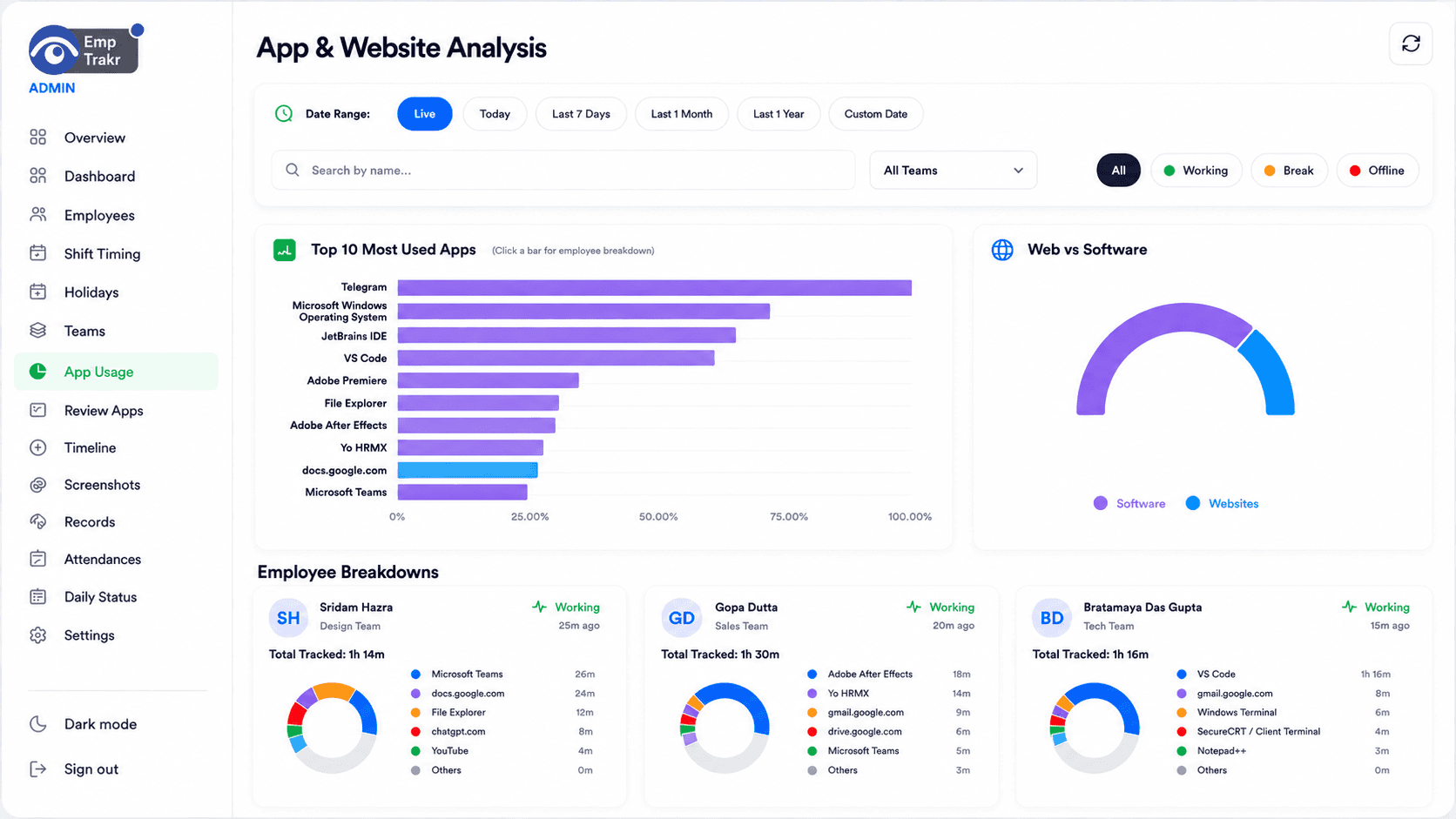
by activity
classified
over time
Productivity tracking software (also called employee productivity tracking or workforce productivity analytics) turns app, website, and activity data into actionable insights like productivity scores, focus time, trend analysis, and reports. It works for office, remote, and hybrid teams and helps managers coach with data instead of micromanagement.
Unlike basic employee monitoring, productivity tracking adds classification, scoring, trend detection, and actionable insights. It measures active vs idle time, top apps, and team performance.
See personal productivity over time.
Compare performance across departments and teams.
Works seamlessly across all environments.
Understand how work time is spent, identify productivity trends, detect workflow bottlenecks, improve team performance, support coaching instead of micromanagement, and make data-driven business decisions.
Showing cards 1 to 3 of 6
See active vs idle time and app usage patterns in real detail.
Spot when focus rises or drops and plan accordingly.
Find repeated context switching or tool misuse.
Showing benefits 1 to 3 of 4
Mark apps and websites as productive, neutral or unproductive based on your company workflow.
Understand when focus rises or drops during the day without digging through raw logs.
Spot repeated context switching, tool misuse and patterns that slow teams down.
EmpTrakr captures app, website and active-time signals during tracked work sessions.
Admins review apps and define productivity categories that match their business.
Dashboards turn classified activity into efficiency trends and productivity summaries.
| Feature | Description | EmpTrakr |
|---|---|---|
| Active Time | Yes | |
| Idle Time | Yes | |
| Productive Hours | Yes | |
| App Usage | Yes | |
| Website Usage | Yes | |
| Focus Time | Yes | |
| Team Productivity | Yes | |
| Productivity Trends | Yes | |
| Reports | Yes |
Live productivity score, active vs idle, and app insights.
Automated score based on classified work time.
Clear distinction between productive work and idle periods.
Track and classify every app and website.
Browser activity and time spent per site.
Team-level summaries and comparisons.
Daily, weekly, and longer-term productivity trends.
Exportable summaries for managers.
Overdue work or low-productivity flags.
Admins see everything; others see only their team.
Live productivity score, active vs idle, and app insights.
Automated score based on classified work time.
Clear distinction between productive work and idle periods.
Track and classify every app and website.
Browser activity and time spent per site.
Team-level summaries and comparisons.
Daily, weekly, and longer-term productivity trends.
Exportable summaries for managers.
Overdue work or low-productivity flags.
Admins see everything; others see only their team.
Live productivity score, active vs idle, and app insights.
Automated score based on classified work time.
Clear distinction between productive work and idle periods.
Track and classify every app and website.
Browser activity and time spent per site.
Team-level summaries and comparisons.
Daily, weekly, and longer-term productivity trends.
Exportable summaries for managers.
Overdue work or low-productivity flags.
Admins see everything; others see only their team.
Software development, QA, and support teams.
High-focus software companies and product teams.
Creative and marketing agencies tracking client projects.
Customer support and call center productivity.
Contact center metrics and efficiency.
Software development, QA, and support teams.
High-focus software companies and product teams.
Creative and marketing agencies tracking client projects.
Customer support and call center productivity.
Contact center metrics and efficiency.
Software development, QA, and support teams.
High-focus software companies and product teams.
Creative and marketing agencies tracking client projects.
Customer support and call center productivity.
Contact center metrics and efficiency.
Project-based and billable hour tracking.
Campaign and content creation productivity.
Accounting, auditing, and analysis teams.
Administrative and clinical support roles.
Teachers, admins, and academic staff.
Project-based and billable hour tracking.
Campaign and content creation productivity.
Accounting, auditing, and analysis teams.
Administrative and clinical support roles.
Teachers, admins, and academic staff.
Project-based and billable hour tracking.
Campaign and content creation productivity.
Accounting, auditing, and analysis teams.
Administrative and clinical support roles.
Teachers, admins, and academic staff.
Productivity tracking adds analytics, scoring, and trends on top of basic activity visibility.
| Feature | Productivity Tracking | Employee Monitoring |
|---|---|---|
| Productivity Analytics | ✓ | Basic |
| Activity Visibility | Limited | ✓ |
| Employee Insights | ✓ | ✓ |
| Reports | ✓ | ✓ |
| Performance Trends | ✓ | Limited |
Productivity tracking adds scoring, app classification, trends, and insights beyond basic hours.
| Feature | Productivity Tracking | Time Tracking |
|---|---|---|
| Active Time Analysis | ✓ | Basic |
| Productivity Score | ✓ | ✗ |
| Project Hours | Limited | ✓ |
| Timesheets | ✗ | ✓ |
| Work Trends | ✓ | Limited |
All productivity data encrypted in transit and at rest.
Enterprise-grade cloud security.
Granular access controls.
Full history of access and changes.
SSO and 2FA supported.
Regular automated backups.
Employees are aware that their work data is being tracked.
Clear policies on what is measured and why.
Configurable classification and visibility options.
Employees see only their own data.
Admins control depth of tracking per team.
Focus on coaching and improvement, never surveillance.
Set clear productivity goals
Focus on trends, not isolated metrics
Avoid micromanagement
Use reports for coaching conversations
Review analytics regularly
Protect employee privacy
Share productivity insights with teams
Balance tracking with trust and respect
Live score, timelines, and app insights.
Clear distinction between work and downtime.
Classified app and website analytics.
Exportable daily, weekly, and team summaries.
Department and team comparison views.
Full visibility from any device.
Excel, CSV, PDF ready for leadership.
Combine productivity with time and attendance data.